 BlueGit

Marble – KWin close & minimize effects (Burn-My-Windows variant)
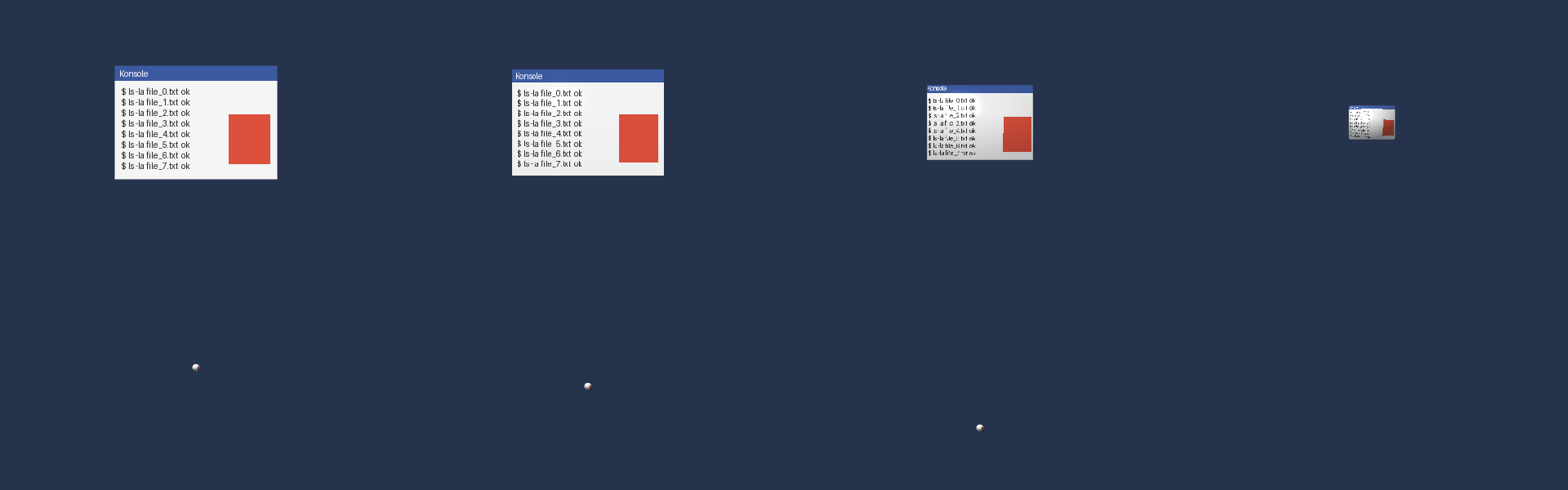
NL – KWin 6 (Plasma 6) sluit-animatie: het venster vormt zich soepel om tot een kleine, glanzende knikker (inhoud blijft zichtbaar), blijft even stil liggen en valt daarna met echte zwaartekracht (constante versnelling vanuit stilstand) 1,5 schermhoogte omlaag, uit beeld.
EN – KWin 6 (Plasma 6) window-close animation: the window smoothly morphs into a small glossy marble (content stays visible), pauses, then drops off-screen under real gravity (constant acceleration from rest) for 1.5 screen heights.
Marble Magic Lamp (minimize)
NL – kwin6_effect_marble_minimize: bij minimaliseren vormt het venster zich net zo om tot een knikker, pauzeert, en valt dan met zwaartekracht (vanuit stilstand) langs een vloeiend S-pad (twee parallelle bewegingen: zwaartekracht richting taakbalk, InOutSine opzij) naar zijn taakbalkknop; in de laatste 10% krimpt hij naar 10%. Herstellen speelt de omgekeerde animatie (knikker stijgt op van de taakbalkknop, pauze, vouwt open). Zelfde instellingen en defaults.
EN – kwin6_effect_marble_minimize: on minimize the window becomes the same marble, pauses, then falls under gravity (from rest) along a smooth S-path (two parallel moves: gravity towards the taskbar, InOutSine sideways) to its taskbar entry, shrinking to 10% over the last 10% of the path. Restore plays it in reverse (marble rises from the taskbar entry, pauses, unfolds into the window). Same settings and defaults. It replaces the active minimize animation (e.g. Magic Lamp).
Installatie / Installation
cp -r kwin6_effect_marble kwin6_effect_marble_minimize ~/.local/share/kwin/effects/Then enable Marble [Burn-My-Windows variant] in System Settings → Window Management → Desktop Effects (it replaces the active close animation; only one can be active). Log out/in if it does not show up.
Instellingen / Settings
| Key | Default | Meaning |
|---|---|---|
Duration | 300 ms | Morph into the marble |
Pause | 600 ms | Marble rests before falling |
Gravity | 4000 px/s² | Fall acceleration; fall time = sqrt(2·distance / g) (close: 1.5 screen heights; minimize: distance to taskbar entry) |
All durations are scaled by Plasma's global animation speed.
Licentie / License & attribution
GPL-3.0-or-later (see LICENSE). This effect is a modified derivative of the KWin port of Energize B from Burn-My-Windows by Simon Schneegans (GPL-3.0-or-later), whose KWin effect code also credits Martin Flöser and Vlad Zahorodnii. The common shader prelude and main.js structure come from that project; the marble shader, gravity fall and settings are new. Original copyright notices are kept in the source files. Modified by Tim Falken, 2026.
Source
| 1 | # Marble – KWin close & minimize effects (Burn-My-Windows variant) |
| 2 | |
| 3 | **NL** – KWin 6 (Plasma 6) sluit-animatie: het venster vormt zich soepel om tot een kleine, |
| 4 | glanzende knikker (inhoud blijft zichtbaar), blijft even stil liggen en valt daarna met echte |
| 5 | zwaartekracht (constante versnelling vanuit stilstand) 1,5 schermhoogte omlaag, uit beeld. |
| 6 | |
| 7 | **EN** – KWin 6 (Plasma 6) window-close animation: the window smoothly morphs into a small glossy |
| 8 | marble (content stays visible), pauses, then drops off-screen under real gravity (constant |
| 9 | acceleration from rest) for 1.5 screen heights. |
| 10 | |
| 11 |  |
| 12 | |
| 13 | ## Marble Magic Lamp (minimize) |
| 14 | |
| 15 | **NL** – `kwin6_effect_marble_minimize`: bij minimaliseren vormt het venster zich net zo om tot |
| 16 | een knikker, pauzeert, en valt dan met zwaartekracht (vanuit stilstand) langs een vloeiend S-pad |
| 17 | (twee parallelle bewegingen: zwaartekracht richting taakbalk, InOutSine opzij) naar zijn taakbalkknop; in de laatste 10% krimpt |
| 18 | hij naar 10%. Herstellen speelt de omgekeerde animatie (knikker stijgt op van de taakbalkknop, pauze, vouwt open). Zelfde instellingen en defaults. |
| 19 | |
| 20 | **EN** – `kwin6_effect_marble_minimize`: on minimize the window becomes the same marble, pauses, |
| 21 | then falls under gravity (from rest) along a smooth S-path (two parallel moves: gravity towards |
| 22 | the taskbar, InOutSine sideways) to its taskbar entry, shrinking to 10% over the last 10% of the path. Restore plays it in |
| 23 | reverse (marble rises from the taskbar entry, pauses, unfolds into the window). Same settings and defaults. It replaces the active minimize animation (e.g. Magic Lamp). |
| 24 | |
| 25 | ## Installatie / Installation |
| 26 | |
| 27 | ```sh |
| 28 | cp -r kwin6_effect_marble kwin6_effect_marble_minimize ~/.local/share/kwin/effects/ |
| 29 | ``` |
| 30 | |
| 31 | Then enable **Marble [Burn-My-Windows variant]** in System Settings → Window Management → |
| 32 | Desktop Effects (it replaces the active close animation; only one can be active). Log out/in if |
| 33 | it does not show up. |
| 34 | |
| 35 | ## Instellingen / Settings |
| 36 | |
| 37 | | Key | Default | Meaning | |
| 38 | |------------|---------|-----------------------------------------------------------------| |
| 39 | | `Duration` | 300 ms | Morph into the marble | |
| 40 | | `Pause` | 600 ms | Marble rests before falling | |
| 41 | | `Gravity` | 4000 px/s² | Fall acceleration; fall time = sqrt(2·distance / g) (close: 1.5 screen heights; minimize: distance to taskbar entry) | |
| 42 | |
| 43 | All durations are scaled by Plasma's global animation speed. |
| 44 | |
| 45 | ## Licentie / License & attribution |
| 46 | |
| 47 | GPL-3.0-or-later (see `LICENSE`). This effect is a modified derivative of the KWin port of |
| 48 | **Energize B** from [Burn-My-Windows](https://github.com/Schneegans/Burn-My-Windows) by |
| 49 | Simon Schneegans (GPL-3.0-or-later), whose KWin effect code also credits Martin Flöser and |
| 50 | Vlad Zahorodnii. The common shader prelude and `main.js` structure come from that project; the |
| 51 | marble shader, gravity fall and settings are new. Original copyright notices are kept in the |
| 52 | source files. Modified by Tim Falken, 2026. |